Volumes
Volumes are network-based block storage. This page is for managing volumes local to a particular slice. For account-wide volume management, you will want to see the Volumes area of the panel.
Volumes are priced at $0.10/month per GB of storage, e.g. 10GB = $1.00/month.
Create Volume
To create a new volume and attach it to the slice, click Create Volume. A dialog will prompt for a volume name, and size in GB. The form will quote the monthly rate for the storage based on the amount requested.
Click Create to proceed. A new dialog will open providing instructions on how to format and mount your new volume. It is okay if you close this window, as you can re-open it any time for reference (see below).
Note
Slices can currently have a maximum of 4 volumes attached at any time, and the current maximum volume size is 1500GB.
Volume List
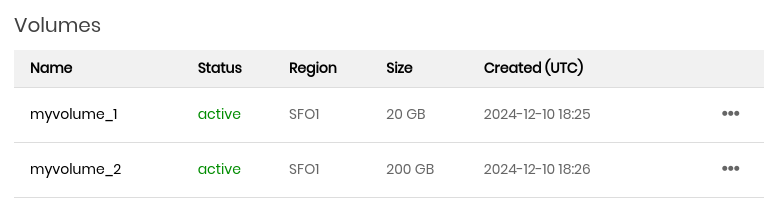
This is a list of all Volumes currently attached to this slice. You can click the ellipses to open a dropdown menu with the following options:
- Rename
Rename the volume.
- Show config
Show the configuration dialog.
- Detach
Detach the volume from the slice.
Note
Detaching a volume does not delete it. You can delete volumes using the dedicated Volumes area of the panel.