Snapshots
Snapshots are on-demand backup images of your slice. You can use them to create new slices, or restore the slice they were created from. This page is for managing snapshots specific to a particular slice. For account-wide management, you will want to use the Images area of the panel.
Create Snapshot
Although not necessary, it is recommended that you power off your slice before taking a snapshot. You don’t have to leave it powered off the entire time - you can power it back on once the snapshot process has begun.
The default snapshot name is the name of your snapshot with the number of seconds since the unix epoch appended. Feel free to change that to whatever you like, then click Create Snapshot to initiate the snapshot process.
The new snapshot will show up in the snapshots list table below. For progress, we show a timer because this can vary substantially due to multiple factors like compression efficiency and current loads on the storage hosts. A pessimistic assumption would be 2GB per minute, but should usually be much faster.
Snapshots List
This is a list of all current snapshots for the slice. There is the snapshot Name, Region, Size, Duration (how long it took to create), and Created date and time in UTC.
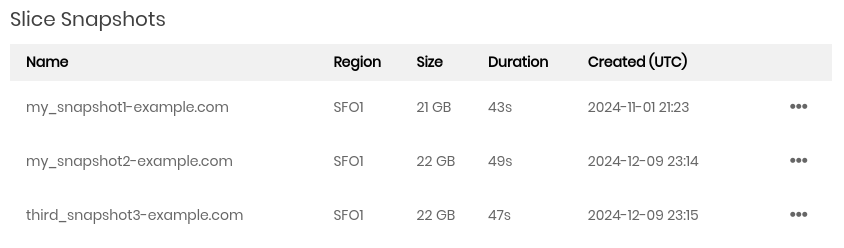
On the far right is an ellipsis dropdown menu. Clicking the menu provides the following options:
- Create Slice
Create a new slice out of this snapshot. This will take you to the Create slice page, auto-selecting the snapshot image for you.
- Restore Slice
Restore the slice with this image. You will be prompted to confirm. Once confirmed, the slice will be rebuilt and essentially “time warp” back to the point this image was created.
Caution
Restoring a slice from a snapshot image will irrevocably replace all data on the slice with that image.
- Rename
A form will open prompting you for a new snapshot name. Enter a new name and click Rename to apply the change.
- Delete
Delete a snapshot. You will be prompted to confirm. Once confirmed, the snapshot will be deleted and will no longer billed.
Snapshot Billing
Snapshots cost $0.05 / month per GB of space. This is only for space used on your disk; for example if you have a 100GB disk and only using 40GB, a snapshot will cost $2.00/month. (40 * 0.05 = 2.00).