symScripts
symScripts are special scripts you can write which are executed only once, on the first time a slice boots. They follow the standard bangpath as for any script, and can use any language supported by the slice, e.g. bash or python.
These scripts can do anything you need during deployment: preinstall and configure packages / frameworks, git pulls, docker setups etc.
symScripts are free.
Create symScript
To create a new symScript, click Create symScript. You will be taken to the Create symScript page. Enter a name for your script, and a short description. Then paste your script into the TextField.
Important
Be sure to include the bangpath in your script, just the same as one being executed at CLI.
Click Create symScript to save it. The symScript will appear in the main symScript page.
Hint
When a slice is deployed with a symScript, the script itself is kept in /root/symScript, and
any output from the script is saved in /root/virt-sysprep-firstboot.log. You can also do normal
redirect of output to your own logfiles, etc. - an example script showing this is below.
symScript Global Variables
There are some global variables you can use in your symScript. Any of the following text in your script will be replaced with these values for your slice:
- SYMSLICE_NAME
Slice hostname.
- SYMSLICE_ID
The unique slice ID.
- SYMSLICE_RAM
Amount of RAM provisioned, as an integer.
- SYMSLICE_IPV4_ADDRESS
Public IPv4 Address
- SYMSLICE_IPV4_PRIVATE
Private IPv4 Address
- SYMSLICE_IPV6_ADDRESS
Public IPv6 Address
- SYMSLICE_CUSTOMVAR
A user-supplied value from the Create Slice page, or JSON payload into the symSlice API. This can be a simple single value, something delimited via CSV or colons, or even a JSON snippet. Maximum length is currently 255 characters.
Hint
Careful with your quotes! Shell scripts in particular will interpret them when your script runs.
For example, this test script should test all of the global variables, along with a test if anything was provided for SYMSLICE_CUSTOMVAR. Feel free to copy/paste this into your own symScript to test it:
#!/bin/bash
#
# Debug global variables.
#

MY_SLICE_NAME='SYMSLICE_NAME';
MY_SLICE_ID='SYMSLICE_ID';
MY_SLICE_RAM='SYMSLICE_RAM';
MY_IPV4_ADDRESS='SYMSLICE_IPV4_ADDRESS';
MY_CUSTOMVAR='SYMSLICE_CUSTOMVAR';

# Set MY_CUSTOMVAR to something else if nothing was provided / is empty.
if [[ -z ${MY_CUSTOMVAR} ]]; then
    MY_CUSTOMVAR="Not provided.";
fi

# Test output to /root/virt-sysprep-firstboot.log
echo "MY_SLICE_NAME = ${MY_SLICE_NAME}";
echo "MY_SLICE_ID = ${MY_SLICE_ID}";
echo "MY_SLICE_RAM = ${MY_SLICE_RAM}";
echo "MY_IPV4_ADDRESS = ${MY_IPV4_ADDRESS}";
echo "MY_CUSTOMVAR = ${MY_CUSTOMVAR}";

# Test output to outside logfile.
cat << EOF > /root/test_vars.log

MY_SLICE_NAME = ${MY_SLICE_NAME}
MY_SLICE_ID = ${MY_SLICE_ID}
MY_SLICE_RAM = ${MY_SLICE_RAM}
MY_IPV4_ADDRESS = ${MY_IPV4_ADDRESS}
MY_CUSTOMVAR = ${MY_CUSTOMVAR}

# install some packages, add users, etc. ...

EOF
symScripts List
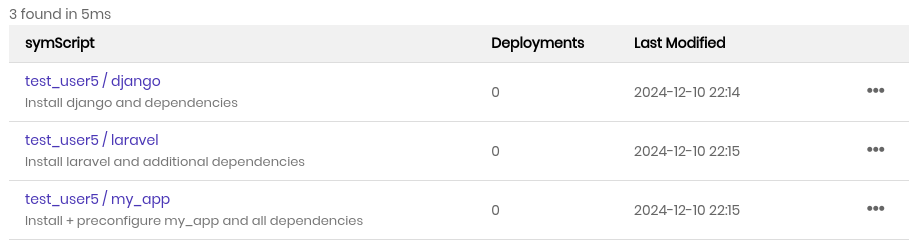
The symScripts list page shows all of your symScripts. They are listed alphabetically by their names, one per line, along with the following details:
- symScript Name
This is the username / Script Name, along with the short description below. You can click the name to access additional details.
The details page provides additional details, such as number of currently active deployments and last modification time, along with the script itself.
Hint
To edit a symScript from it’s details page, click the pen icon next to the script name.
- Deployments
Number of total deployments (number of slices created).
- Last Modified
Timestamp in UTC when the script was last modified.
symScript Functions
There is an ellipsis dropdown menu for each symScript. The functions are as follows:
- Create Slice
Create a slice, assigning this symScript to it. This function is a shortcut to Create -> Slices -> symScripts, with the symScript preselected for you.
- Edit
Open the symScript Edit page for modification.
- Delete
Delete symScript. You will be prompted to confirm. Once confirmed, the symScript is deleted.