Domains
Domains is a DNS Manager that enables management of your DNS within the Syminet Cloud. It supports many record types, such as A, CAA, CNAME, MX, NS, SRV, SSHFP and TXT.
The Domains DNS service is free.
To use domains you will first need to register a domain name. Then, at your domain registrar point your domain to the Syminet Namservers (DNS):
ns1.syminet.com
ns3.syminet.com
Add a Domain
To add a domain, click Add Domain to open the Add Domain window. Enter your
domain name. You can optionally select one of your slices here to automatically add
some default DNS records pointing to your slice. Default records are two A records pointing to
the selected slice: one for the domain name itself, and another for the www subdomain.
The domain will appear in the main Domains list page.
Domains List
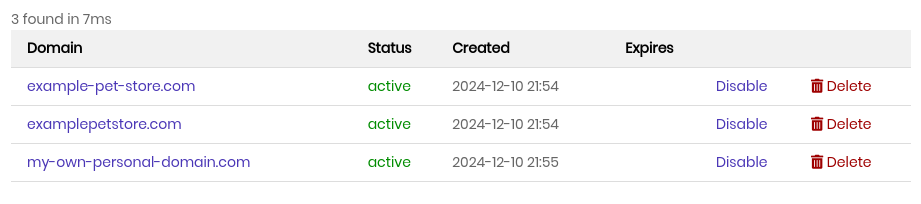
The domains list page shows all of your domains. They are listed alphabetically one per line, along with the following details:
Domain
Fully Qualified Domain Name (FQDN).
Important
Click a domain name to access it’s Domain Records page.
Status
Domain status. This will be one of three values:
- active
The domain is active and the Syminet Nameservers are actively answering queries.
- disabled
The domain is disabled and the Syminet Nameservers are not answering queries.
- suspended
The domain is suspended and the Syminet Nameservers are not answering queries.
Note
disabled status can be toggled by users (see below) to disable DNS for a domain without deleting any of the zonefile records. Suspended does the same thing, but is administratively set by support staff.
Created
The date the domain was added to the Syminet Cloud (not the creation date at the registrar).
Disable / Enable
If a domain is active and you would like to disable DNS, you can click Disable. You will be prompted to confirm. Once confirmed, the Syminet DNS will stop answering DNS queries for the domain.
Conversely, if a domain is disabled this will say Enable, which you can click to re-enable the domain. You will be prompted to confirm. Once confirmed, the Syminet DNS will resume answering DNS queries for the domain.
Delete
To delete a domain, click Delete. You will be prompted to confirm. Once confirmed, the domain and all of it’s zonefile records will be deleted from the Syminet DNS servers.
Caution
Deleting a domain removes all domain zonefile information from the Syminet Cloud.