Servers
Your symBalancer distributes traffic to backend servers (slices).
Add Backend Server
Click Add server.
Select the slice you would like to add.
Click Add.
Note
The dropdown will only show slices with a Private IPv4 address, which are not currently assigned to a balancer. Also, slices can only be assigned to balancers in the same region.
Backend Servers List
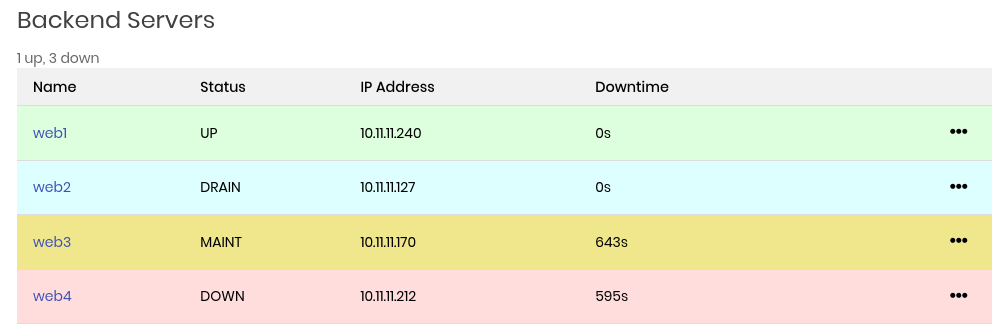
This is a list of the backend slices assigned to your symBalancer. Rows can have different colors depending on server state, which is explained below.
Backend Server States
- UP
Server is passing health checks and balancer is sending traffic.
- DRAIN
Server is administratively set to stop passing traffic, but without interrupting any current requests. Balancer will not resume sending traffic until server is set back to UP. This state is typically used when you want to “cleanly” bring a server down for maintenance, without any interruptions to existing connections. Health checks are still being sent.
- MAINT
Server is adminisitratively set to stop passing traffic immediately. Balancer will not resume sending traffic until server is set back to UP. Health checks are not being sent.
- DOWN
Server is failing health checks and balancer is not passing traffic.
Each row also has the following columns:
- Name
Hostname of the slice.
- Status
UP, DRAIN, MAINT or DOWN.
- IP Address
Private IPv4 of the slice.
- Downtime
Number of seconds the slice has been in MAINT or DOWN state since last time the symBalancer settings were modified.
Note
When in DRAIN state, health checks are still happening even though the balancer has stopped sending traffic. This means that if health checks fail, the balancer will set the slice to DOWN. Often this is to be expected, as it was put into DRAIN to cleanly remove it before doing maintenance.
To the right is an ellipsis menu that allows you to administratively set backend server states:
- READY
Set the server to UP. Balancer will do health checks, which must pass before it resumes sending traffic.
- DRAIN
Set server to DRAIN state.
- MAINT
Set server to MAINTENANCE state.
- Remove
Remove server from this balancer.